
Online security has become more important than ever. Every day, millions of people access email accounts, social media platforms, cloud storage services, banking applications, and business systems. Unfortunately, cybercriminals are constantly attempting to gain unauthorized access to these accounts.
Many users believe that a strong password is enough to stay secure. While strong passwords are important, they are no longer sufficient on their own. Data breaches, phishing attacks, malware, and password leaks have made it easier for attackers to obtain login credentials.
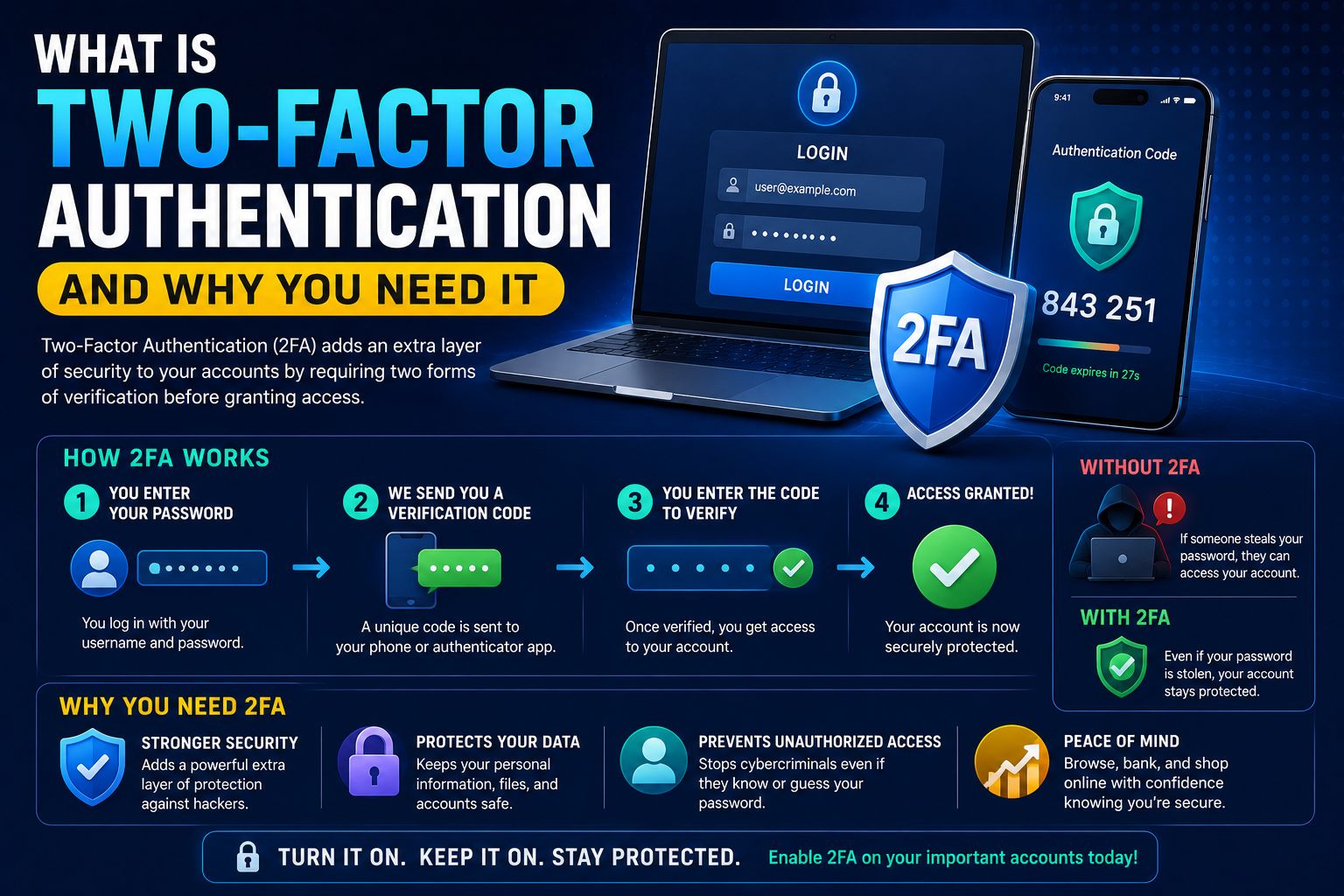
This is where Two-Factor Authentication (2FA) comes in. By adding an additional layer of security, 2FA significantly reduces the risk of unauthorized access.
In this guide, you’ll learn what two-factor authentication is, how it works, and why every internet user should enable it.
What Is Two-Factor Authentication?
Two-Factor Authentication is a security process that requires users to verify their identity using two separate forms of authentication before gaining access to an account.
Instead of relying only on a password, users must provide an additional verification factor.
This extra step makes it much harder for attackers to access accounts even if they know the password.
Understanding Authentication Factors
Authentication methods typically fall into three categories.
Something You Know
Examples include:
- Passwords
- PIN codes
- Security questions
Something You Have
Examples include:
- Smartphones
- Security keys
- Authentication apps
Something You Are
Examples include:
- Fingerprints
- Facial recognition
- Iris scans
Two-factor authentication combines two different categories to verify identity.
How Two-Factor Authentication Works
A typical login process looks like this:
Step 1
Enter your username and password.
Step 2
The service requests a second verification factor.
Examples include:
- Authentication app code
- SMS verification code
- Fingerprint scan
- Security key
Step 3
After successful verification, access is granted.
Even if a hacker steals your password, they still need the second factor.
Why Passwords Alone Are Not Enough
Many users underestimate how vulnerable passwords can be.
Data Breaches
Companies occasionally experience security breaches that expose user credentials.
Phishing Attacks
Attackers create fake websites designed to steal passwords.
Malware
Malicious software can capture login information.
Password Reuse
Using the same password across multiple websites increases risk dramatically.
For more account protection strategies, see How to Protect Your Online Accounts from Hackers.
Benefits of Two-Factor Authentication
Improved Account Security
The biggest benefit is stronger protection against unauthorized access.
Even if a password becomes compromised, attackers still need the second verification factor.
Reduced Risk from Data Breaches
Data breaches happen regularly.
Accounts protected by 2FA remain significantly more secure after password exposure.
Protection Against Phishing
Some advanced 2FA methods can help reduce the effectiveness of phishing attacks.
While phishing remains dangerous, additional verification creates another obstacle for attackers.
Better Protection for Sensitive Information
Many online accounts contain:
- Personal information
- Financial data
- Business documents
- Private communications
2FA helps protect these valuable resources.
Common Types of Two-Factor Authentication
SMS Verification Codes
A verification code is sent to your mobile phone via text message.
Advantages
- Easy to use
- Widely available
Disadvantages
- Vulnerable to SIM-swapping attacks
Authentication Apps
Popular authentication apps include:
- Google Authenticator
- Microsoft Authenticator
- Authy
Advantages
- More secure than SMS
- Works offline
Disadvantages
- Requires setup
Authentication apps are generally recommended over SMS verification.
Security Keys
Physical security keys offer some of the strongest account protection available.
Advantages
- Extremely secure
- Resistant to phishing attacks
Disadvantages
- Additional cost
- Must be carried physically
Biometric Authentication
Many devices support:
- Fingerprint recognition
- Facial recognition
Biometrics provide convenience and strong security.
Which Accounts Should Use 2FA?
Certain accounts should always have two-factor authentication enabled.
Email Accounts
Email accounts often control password recovery for other services.
Banking Accounts
Financial accounts should always use additional security.
Social Media Accounts
Compromised social media profiles can damage reputations and spread scams.
Cloud Storage Services
Cloud platforms often contain important files and backups.
For storage recommendations, read Cloud Storage Explained: Google Drive vs OneDrive vs Dropbox.
Business Accounts
Organizations should secure employee accounts whenever possible.
Common Myths About Two-Factor Authentication
Myth 1: My Password Is Strong Enough
Even strong passwords can be stolen through phishing or data breaches.
Myth 2: Hackers Won’t Target Me
Cybercriminals frequently target large numbers of users simultaneously.
Anyone can become a victim.
Myth 3: 2FA Is Too Complicated
Modern two-factor authentication systems usually require only a few seconds.
The added security is well worth the small inconvenience.
How to Enable Two-Factor Authentication
Most online services provide simple setup instructions.
Typical steps include:
- Open account settings.
- Navigate to security settings.
- Enable two-factor authentication.
- Select a verification method.
- Save recovery codes securely.
Recovery codes are important if you lose access to your authentication device.
Best Practices for Using 2FA
Use Authentication Apps
Authentication apps generally provide stronger protection than SMS.
Save Recovery Codes
Store recovery codes securely.
Secure Your Smartphone
Your phone often serves as your second authentication factor.
Never Share Verification Codes
Legitimate companies will never ask for your verification codes.
Two-Factor Authentication and Cybersecurity
Two-factor authentication is one of the most effective cybersecurity tools available today.
However, it should be combined with:
- Strong passwords
- Software updates
- Secure browsing habits
- Malware protection
For additional guidance, see Cybersecurity Tips Everyone Should Follow in 2026.
Frequently Asked Questions
What is two-factor authentication?
Two-factor authentication requires two forms of verification before granting account access.
Is 2FA necessary?
Yes. It significantly improves account security.
Which 2FA method is best?
Authentication apps and security keys are generally considered the most secure options.
Is SMS verification safe?
SMS-based authentication is better than no 2FA but is generally less secure than authentication apps.
Should I enable 2FA on every account?
At minimum, enable it on email, banking, cloud storage, and social media accounts.
Conclusion
Two-factor authentication is one of the simplest and most effective ways to improve online security. As cyber threats continue evolving, relying solely on passwords is no longer enough.
By enabling 2FA, users add a powerful layer of protection that helps prevent unauthorized access, data breaches, and account takeovers. Whether you’re protecting personal accounts or business systems, implementing two-factor authentication is one of the smartest security decisions you can make.